
Free CV maker · Works with ChatGPT and Claude
Make a great CV in minutes. No formatting hassle.
Fill in your details, and CVmakr.ai takes care of the layout, spacing, and page breaks. To tailor your CV to a job and write the cover letter, use the built-in AI, or connect the one you already use, like ChatGPT or Claude. Either way, you get a finished PDF.
- No account needed
- Free PDF, no watermark
- Works with your own AI
- Hosted in the EU
✓ Fits on one page
Bring your own AI
Your AI writes the CV. CVmakr.ai makes it look good.
Connect the assistant you already chat with, and ask it to tailor your CV to a job or write the cover letter. It saves the result straight into CVmakr.ai, laid out and ready to download as a PDF. No copying text into Word, no broken formatting.
- ChatGPT
- Claude
- Gemini
- Other AI apps
- Nothing extra to pay us. Your own assistant does the writing, on the plan you already have.
- CV and cover letter in one go. It saves a CV tailored to the job, with a matching cover letter in the same design.
- Your CVs stay as they are. It saves new copies or suggests edits that you accept or reject.
- Set up in a minute. Add one address to your assistant and sign in.
Address: https://cvmakr.ai/mcp
Claude works on its free plan. ChatGPT and Gemini need a paid plan to add connectors. No assistant? Use the built-in AI
Tailor my CV to this job, write a cover letter, and save both in CVmakr.ai: Frontend Engineer at Acme, Zurich …
- CVmakr.ai · Read your CVs
- CVmakr.ai · Saved a new CV with cover letter
Done. I started from your main CV, put Angular and TypeScript up front, and wrote a cover letter addressed to Acme. The job also asks for German, which your CV doesn't mention yet.
Acme – Frontend EngineerCV and cover letter · Open in CVmakr.ai to download the PDF
Why CVmakr.ai
Making a CV shouldn't be this annoying
Most CV tools are too complicated, want a subscription before you can download your PDF, or break the layout as soon as you change a line. CVmakr.ai is built the other way around: you write, it handles the rest.
| Usual CV tools | CVmakr.ai |
|---|---|
| Pay for their AI on top of the one you have | Works with ChatGPT and Claude |
| Fiddle with margins, spacing, and page breaks | The layout takes care of itself |
| Pay or subscribe to download your PDF | Free PDF download, no watermark |
| Create an account before you can start | Start right away, no account needed |
| Rewrite your CV by hand for every job | AI tailors it, you approve each change |
| Write the cover letter separately in Word | A matching cover letter in the same design |
| Translate, then repair the broken layout | Translate in one click, layout stays |
How it works
Three steps to a finished CV
1. Fill in your details, or import your CV
Type them in once, or upload your existing CV as a PDF and everything is filled in for you.
2. Choose your style
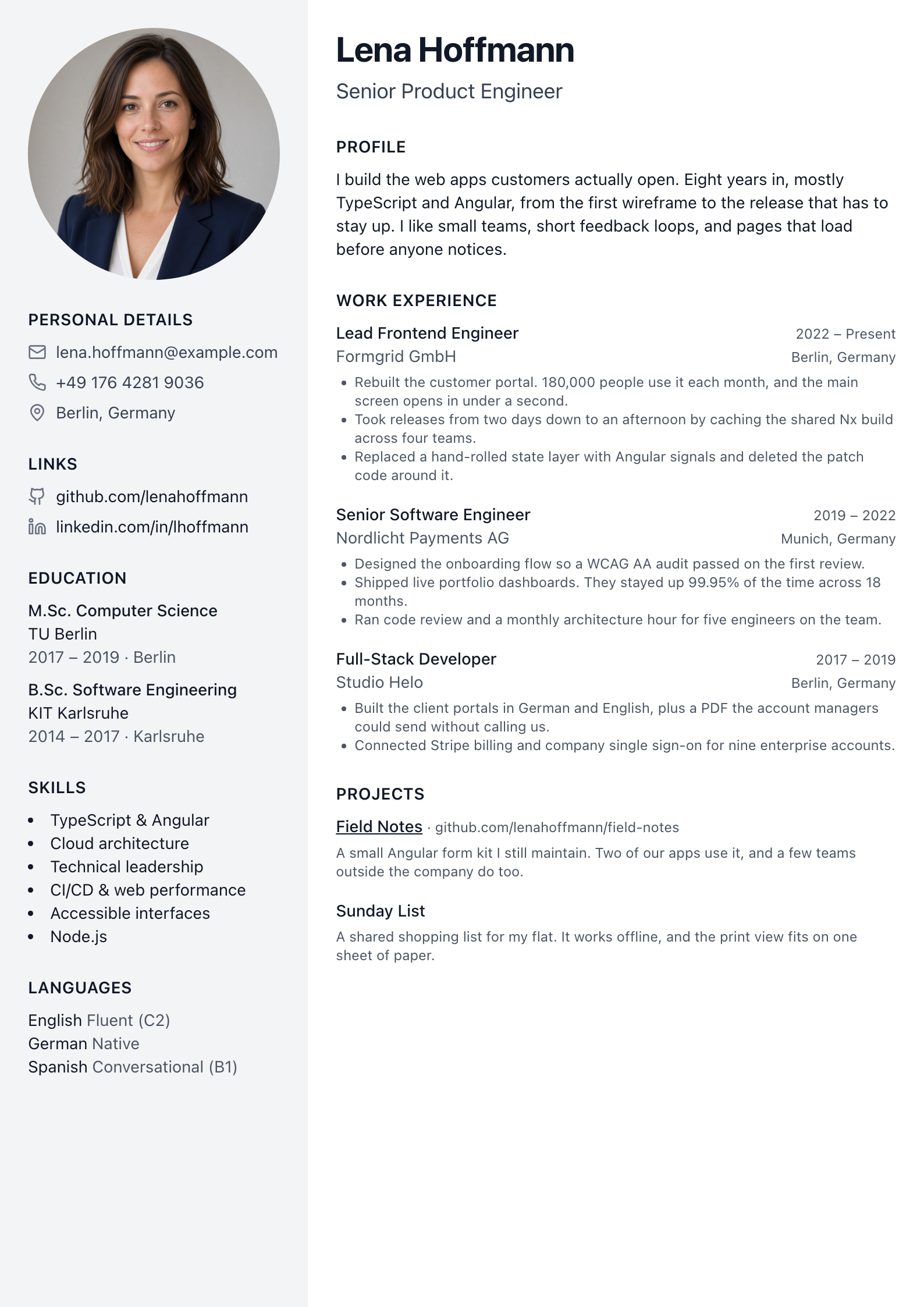
One or two columns, colors, photo, font, and paper size. Whatever you pick, everything stays aligned.
3. Download your PDF
A clean PDF with real text, ready to send. Free, without a watermark.
No assistant? Use the built-in AI
Tailor your CV to any job. You approve every change.
Paste the job post, and the AI suggests edits right on your CV, like track changes in Word. Accept what fits, reject the rest. It also drafts a matching cover letter.
Lead Frontend Engineer
Formgrid GmbH · 2022 – Present
Rebuilt the customer portal.Rebuilt the customer portal in Angular and TypeScript. 180,000 people use it each month.- Took releases from two days down to an afternoon across four teams.
Why: The job asks for Angular and TypeScript. Your skills list both, so name them where they count.
Ready for screening software
Uses the job's keywords where they're true for you, so applicant tracking systems (ATS) and recruiters see the match.
No hallucinations
It works with what's in your CV. No invented jobs, degrees, or dates.
Accept or reject each change
Every suggestion is marked on your CV, with a reason. Nothing changes without your OK.
Translate in one click
German, French, English, or any other language. The layout stays exactly as it is.
Pricing
The CV maker is free. So is using your own AI.
The built-in AI is free while it's in beta. No subscription, no paywall at the download button, no watermark.
CV maker
Free
No account needed
- Full editor and all layout options
- Unlimited CVs and versions
- PDF download, no watermark
- Saved in your browser
Your own AI
Free
With a free account
- Connect ChatGPT, Claude, or Gemini
- Tailored CVs and cover letters
- Claude works on its free plan; ChatGPT and Gemini need a paid plan
- Cloud storage on all your devices
Built-in AI
Free during beta
With a free account
- Everything in CV maker
- Tailor your CV to job posts
- Cover letters for each job
- Translate to any language
- Import your old PDF CV
- Cloud storage on all your devices
Hosted in the EU. Without an account, your CV never leaves your browser.
Questions
What is CVmakr.ai?
Can I use CVmakr.ai with ChatGPT, Claude, or Gemini?
Does it make cover letters too?
Is it really free?
Do I need an account?
Will the built-in AI stay free?
Will the AI make things up?
Will my CV get past screening software (ATS)?
Why not just use ChatGPT?
Which languages does it support?
Where is my data stored?
Make your CV now. It's free.
No account, no subscription, no fiddling with the layout.